CHAPTER 01 / 06
Chapter 1: A rake with teeth pointing down
Our Worm Farm needs a rake. Start with three things you can point to: a handle, a bar, and five teeth. The teeth reach the ground. The handle points up toward the farmer.
Your job: make one tooth, make a row, then change how many teeth the rake has.
Find up, across, and forward
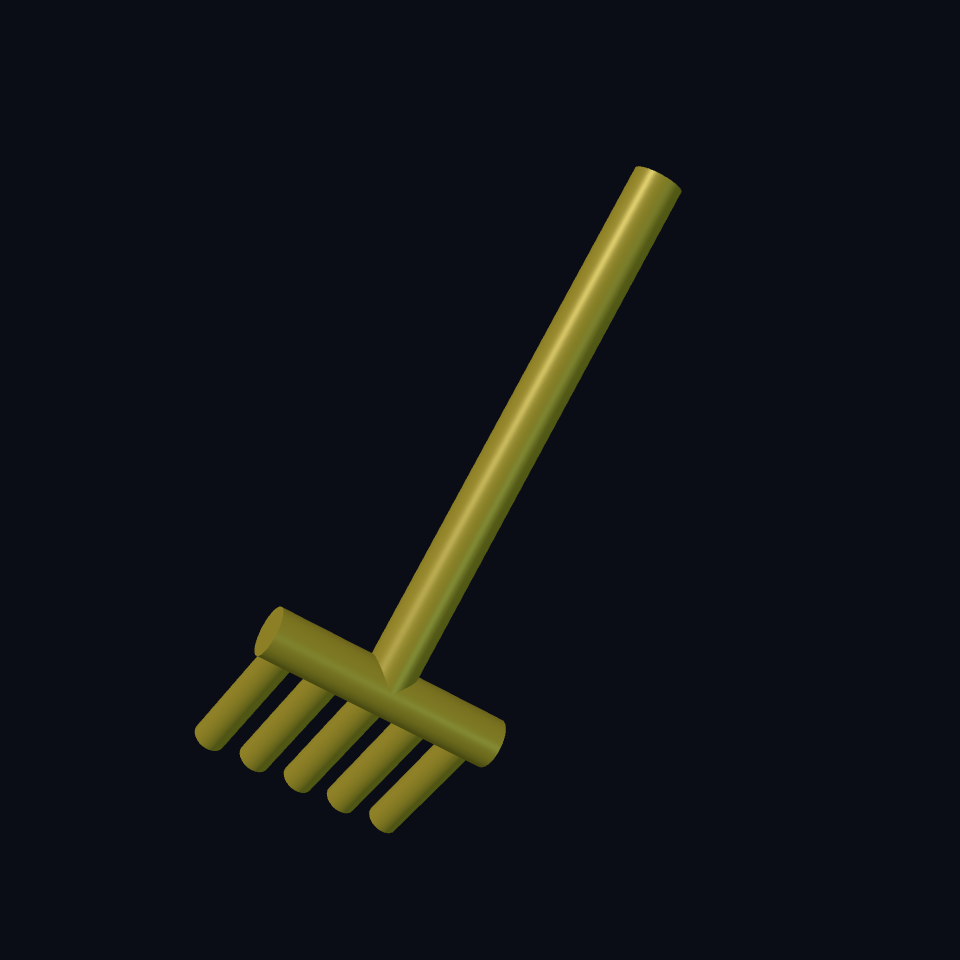
Think of the printer bed as a table. X goes across it, Y goes away from you, Z goes up. A cylinder starts on that table and grows along Z.
Read (cylinder 1.3mm 12mm) as “a round tooth, radius 1.3, height 12.” Radius is half the width. The flat tip sits at Z = 0; its other end reaches the bar at Z = 12. The tooth does not need rotating.
Reference: cylinder.
Make the bar and handle
The bar crosses X. We turn a cylinder a quarter turn around Y: rotate 0 90deg 0. Its length is centred with :align '(center center center), then translate lifts it to the tops of the teeth.
The handle starts at the bar too. A smaller turn, rotate -35deg 0 0, makes it lean upward and backward. 35deg means 35 degrees. Imagine holding the real rake: the handle must rise away from the ground while the teeth stay down.
union joins overlapping shapes. The tops of the teeth enter the round bar, and the handle enters its middle. Touching in a picture is insufficient; these pieces need shared material.
Turn one tooth into five
repeat-union i tooth_count makes a row and joins it. For five teeth, i takes the values 0, 1, 2, 3, 4. We subtract 2 to centre them, then multiply by the 4 mm spacing:
| Tooth | X position |
|---|---|
| First | −8 mm |
| Second | −4 mm |
| Middle | 0 mm |
| Fourth | 4 mm |
| Last | 8 mm |
let* gives dimensions names. Read tooth-length as a labelled ruler. Later expressions can use rulers named above them. head-length follows the number of teeth, so its ends stay near the outer teeth.
You can change tooth_count in the controls instead of copying and pasting another tooth.
Build the rake
(model
  (params
    (number tooth_count 5 :label "Rake teeth" :min 3 :max 7 :step 1))
  (part rake
    (let* ((tooth-length 12mm)
           (tooth-radius 1.3mm)
           (head-height tooth-length)
           (head-radius 2mm)
           (tooth-spacing 4mm)
           (head-length (+ (* (- tooth_count 1) tooth-spacing) (* head-radius 2)))
           (handle (translate 0 0 head-height
             (rotate -35deg 0 0 (cylinder 2mm 44mm))))
           (crossbar (translate 0 0 head-height
             (rotate 0 90deg 0
               (cylinder head-radius head-length :align '(center center center)))))
           (teeth (repeat-union i tooth_count
             (translate (* (- i (/ (- tooth_count 1) 2)) tooth-spacing) 0 0
               (cylinder tooth-radius tooth-length)))))
      (union handle crossbar teeth)))
  (verify
    (tag connected-rake)
    (metric pieces (stl connected-component-count))
(expect pieces (= 1))))Try, predict, inspect
- Open the complete example. Count five teeth. Find their flat tips at Z = 0.
- Set
tooth_countto 7. Predict: two more teeth and a longer bar. The handle stays in the middle. - Turn the view sideways. The teeth point toward the bed; the handle rises away from it.
- As a deliberate mistake, change only
head-heightto20mm. The teeth no longer reach the bar. Rendering may work, but the connected-piece check should fail. Restoretooth-length.
verify at the bottom asks for one connected piece. Run model verification after rendering. It catches a detached handle or row of teeth; it cannot decide whether the rake looks good.
You can now: read dimensions, turn and move a shape, repeat a tooth, and check that joins actually join. Next, give the farmer a hollow house.